Smart HTML to PDF API with Element Coordinates & Self-Healing Layouts
Traditional PDF APIs are black boxes. Fork PDF returns the PDF plus a queryable layout map. Your test case can read any element’s page and coordinates, return a patch, and the engine re-renders before delivery. Use it to extract e-signature coordinates, build accurate Tables of Contents, and auto-correct split layouts in a single API call.
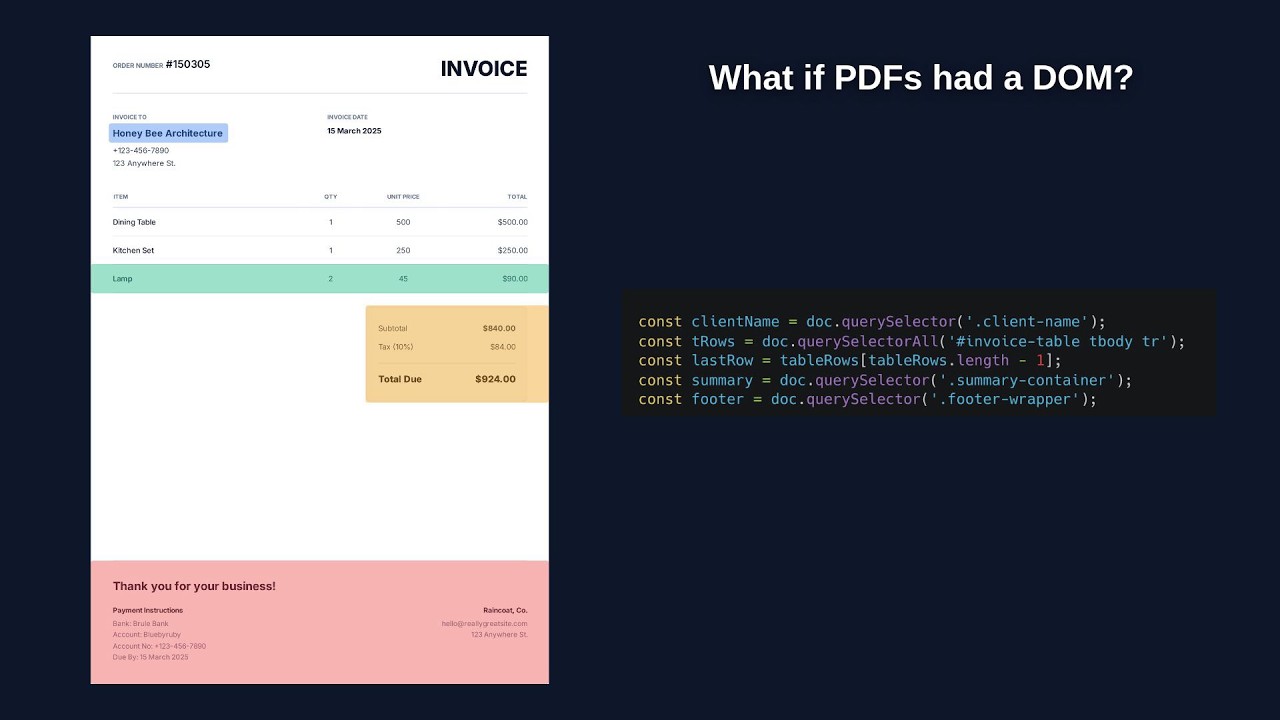
Extract coordinates & return custom data in one call
Stop running secondary PDF parsers or OCR tools just to locate dynamic signature boxes. Query your rendered HTML server-side and return any arbitrary keys from the test script. They arrive under testResults in the API response, giving you exact bounding boxes, anchor coordinates, and dynamic subtotals in a single pass.
const sigBox = doc.querySelector('#signature-box');
const total = doc.querySelector('#computed-total')?.innerText;

// Return any custom properties — they arrive under testResults in the API response
return {
  success: true,
  signature: {
    // pages are 0-indexed; +1 gives the human-readable page
    page: sigBox.pages[0] + 1,
    x: sigBox.geometry.x,
    y: sigBox.geometry.y,
    width: sigBox.geometry.width,
    height: sigBox.geometry.height
  },
  totalAmount: total,
  generatedAt: Date.now()
};Keep charts and insights unified across page breaks
In executive reports and multi-page analytics dashboards, dynamic text often pushes charts onto the following page—orphaning visualizations away from their analysis. Fork PDF inspects spatial boundaries server-side: if a chart and its narrative decouple, it returns a patch to auto-compact preceding KPI cards and lock them to the same page.
const commentary = doc.querySelector('#commentary');
const chart = doc.querySelector('#kpi-chart');

// Ensure visualization and analysis stay glued to the same physical page
if (commentary.pages[0] !== chart.pages[0]) {
  return {
    patch: { compactKpis: true }
  };
}

return { success: true };Generate dynamic Table of Contents with exact page numbers
HTML has no native concept of print page numbers. Instead of spinning up multi-pass Puppeteer scripts or guessing heights, Fork PDF renders your document in Pass 1, resolves which page every section heading landed on, and patches the complete Table of Contents into your template for Pass 2—all in a single API call.
const isTocPopulated = doc.querySelector('.toc-page-num');

// Pass 1: Measure physical page numbers of all section headings
if (!isTocPopulated) {
  const sections = doc.querySelectorAll('h2[data-toc]');
  const tocEntries = [];

  for (const heading of sections) {
    tocEntries.push({
      title: heading.innerText,
      // pages are 0-indexed; +1 gives the TOC page number
      page: heading.pages[0] + 1
    });
  }

  return {
    patch: { toc: tocEntries } // Injected into template on Pass 2
  };
}

return { success: true };Take your spatial data offline
Stop treating PDFs like black boxes. Download the complete spatial map using our Node.js SDK to access the exact coordinates and page numbers of every element locally. Extract this structural data to power guided e-signature experiences or feed it to AI models to audit layout fidelity.
const { SpatialDocument } = require('forkpdf');

(async () => {
  const doc = new SpatialDocument();
  await doc.load('./data.pb');

  const formDiv = doc.querySelector('.form-div');
  console.log(formDiv.geometry, formDiv.pages);
})();npm install forkpdfArchive-ready and accessibility-aware PDFs
Generate PDF/A-2/3/4 standalone, or combine them with the matching PDF/UA version. Fork PDF verifies that every output font is embedded and Unicode-mapped, and can reject external or system fonts with a strict font policy.
- PDF/A-2/3/4 — stable, machine-validated archival output.
- PDF/UA-1/2 — tagged output; experimental until the human audit.
- Verified font embedding — reported as
fontEmbedding: "verified". - Capability discovery — query the live compatibility matrix from the API.
Compliance capability matrix → · Try it in the free HTML to PDF tool →
{
  "compliance": {
    "pdfUa": 1,
    "pdfA": "3b"
  },
  "fontPolicy": "strict",
  "complianceStatus": {
    "fontEmbedding": "verified",
    "fontPolicy": "strict",
    "pdfA": "stable",
    "pdfAFlavor": "3b",
    "pdfUa": "experimental",
    "pdfUaVersion": 1
  }
}
Two-tiered autonomous self-healing.
Fork PDF features a powerful, two-tiered self-healing architecture. In Tier 1 (Internal Patch Loop), spatial checks return a patch for layout issues and re-render the document before delivery, with zero network latency. For structural failures, Tier 2 (Webhook Fallback) safely aborts and routes your complete JSON return payload directly to your webhook, allowing your backend to automatically swap templates or adjust configurations. See the full example in the documentation.
Autonomous Self-Correction Loop
Autonomous Self-Correction Loop
Endpoint Listener
Simple, predictable pricing.
Free Trial
- 1 Project
- 5 Total Templates
- 2 Team members
- 3 Total API keys (60 req/min)
- Managed S3 (6 regions) or BYO-S3
- Webhook & custom payload delivery
- Fillable AcroForms
Starter
- 3 Projects
- 100 Total Templates
- 3 Team members
- 6 Total API keys (60 req/min)
- Managed S3 (6 regions) or BYO-S3
- Webhook & custom payload delivery
- Fillable AcroForms
Growth
- 10 Projects
- 1000 Total Templates
- 10 Team members
- 24 Total API keys (240 req/min)
- Managed S3 (6 regions) or BYO-S3
- Webhook & custom payload delivery
- Fillable AcroForms
- PDF Generation & Data Extraction 2 Credits
- Failed Validation (PDF Discarded) 1 Credit
Guides
Practical fixes for the layout problems document automation usually leaves to you.
- Table of contents Real page numbers after layout, not estimates.
- Prevent page breaks Keep tables, charts, and commentary together.
- Element coordinates Place signatures with exact page coordinates.
- PDF generator API What to check before choosing a Node.js API.
- PDF/A and PDF/UA capabilities Standalone and combined output, font policy, and capability discovery.
- WCAG 2.2 AA checks Automated results and sample PDFs.
Frequently Asked Questions
Everything you need to know about spatial coordinate extraction, self-healing layouts, and integration.
Product & Technical Capabilities
How do I get an element's coordinates in a generated PDF?
Attach a spatial test case to your generation. Your script reads the layout map with doc.querySelector('#signature-box') and returns the geometry (page, x, y, width, height) under testResults in the API response. Coordinates are in PDF points, and pages is 0-indexed; add 1 for a human-readable page number. No PDF parser, no OCR, no second render pass.
How do I build a PDF Table of Contents with correct page numbers?
HTML has no concept of print page numbers, and estimating them breaks as content shifts. Fork PDF measures the physical page each heading lands on after rendering, patches the results into your template, and re-renders — both passes in a single API call with 100% accurate numbers.
How do I stop tables or charts from splitting across page breaks?
For static content, standard print CSS (page-break-inside: avoid) just works. For dynamic layouts, your test case detects the split server-side — e.g., commentary.pages[0] !== chart.pages[0] — and returns a patch, and the engine re-renders automatically before the PDF is ever delivered.
How is Fork PDF different from other HTML-to-PDF APIs?
Traditional PDF APIs hand you a finished file and nothing else. Fork PDF exposes the rendered document as a queryable DOM — every element's coordinates, dimensions, computed styles, and page placement — so you can extract data, validate layout, and fix broken documents in the same API call that generates them.
Does Fork PDF create fillable PDF forms?
Yes. Set pdfForm: true and standard HTML inputs become interactive AcroForm fields. Use targetLang to embed fonts for non-Latin scripts — form input in Hindi, Thai, Japanese, Chinese, and Korean renders correctly.
Reliability, Storage & Billing
What happens when a document fails layout validation?
Minor issues self-heal in-flight via patch re-renders (up to 2 internal re-attempts). Unrecoverable failures abort the document, cost 1 credit instead of 2, and forward your custom error payload to your webhook — where your backend can swap templates and retry while preserving the original tracking ID.
Can I generate PDFs from a URL or my own HTML, or only from templates?
All three. Pass a url, a raw htmlContent string, or a templateId from your dashboard (Nunjucks templates with saved test cases). The data payload works for both templates and raw HTML.
Do you store my generated documents?
Your choice: managed S3 storage across 6 regions, or bring your own bucket (BYO-S3) with Zero-Data Retention — files are written directly to your storage and never persist on Fork PDF infrastructure.
What happens if my webhook server is down when a PDF completes?
Failed deliveries retry automatically at immediate, 15s, and 30s. If all attempts fail, the payload is quarantined in your Dead Letter Queue for 3 days (up to 1,000 entries) instead of being dropped. You can replay individual entries or trigger a bulk recovery that tests your server with a single canary payload before draining the rest.
How do credits work?
A completed generation with data extraction costs 2 credits; a failed validation costs 1. The free trial includes 100 credits for 14 days with no credit card. Starter ($39/mo) includes 5,000 credits and Growth ($149/mo) includes 25,000, with metered overage beyond that.